How to register in a CPD Oztag district competition
REGISTRATION INFORMATION
This season and moving forward our registration process will migrate over to the ‘Assemble Sports’ platform registration system as per our governing body – Australian Oztag Sports Association (AOSA) directive.
It is important to note that all registrations are now charged as a ‘per player fee’ and the ‘per team fee’ is no longer an option.
Mixed div teams have a 12 player minimum requirement
Men’s div teams have a 10 player minimum requirement
The Assemble Sports registration system requires all users to sign-up first before being able to register in a CPD Oztag comp
This can be done via the link in the ‘HOW TO REGISTER‘ section in the table below.
It isVERY IMPORTANTthat you read this section in its entirety first, BEFORE going on to acces the link to sign-up for the Assemble Sports registration platform, so that you know how to navigate through the system and register into your intended CPD Oztag comp
CLOSING REGO DATE
Saturday, 25th October 2025
COST
$15/player Australian Oztag mandatory annual membership subscription fee:
This is a one-off payment per calendar year and is a mandatory fee that all Oztag competitions nation-wide have incurred. Players cannot register in any Oztag competition without having paid this membership subscription.
When registering into your first CPD Oztag competition for the calendar year, the subscription payment will be added to the overall fee of your registration upon completion.
PLUS –
$110/player:
If registering via the ‘Assemble Sports’ system inside an established team for the district comp you wish to play in. A team delegate would have pre-registered the team first, then provided you an email with a registration link and code to access that team and make your payment. This option in the Assemble Sports system is known as “Join a team“.
OR –
$115/player:
If registering as an individual, and in need of a team. This option in the Assemble Sports system is known as “Register myself to an event or competition“.
CONDITIONS OF REGISTRATION
Upon registration the following documents will need to be acknowledged (box ticked) at the completion of the process. They have been included here as they contain any and all information that details the structure, rules and processes of our competitions and more often than not answer any questions/queries (FAQ’s) people may have regarding Oztag.
Sign-in OR Sign-up to the ‘Assemble Sports’ registration platform. Access the link below and follow the prompts (watch the ‘help video’ below that explains the process).
IMPORTANT – Do not ‘sign-up’ multiple times as it will make duplicate profiles if done again. Once you have signed-up, you only need to ‘sign-in’ when accessing the platform in future.
Step 2:
Once inside the Assemble Sports registration platform, select the correct *option according to your choice of registration. Refer to ‘Support Info’ section at bottom of this table for definitions of each option and videos below that explain how to navigate through each process.
Registering a team in a CPD Oztag district competition:
Registering into a pre-registered team (“Joining a team”) in a CPD Oztag district competition:
Registering as an Individual to be allocated a team in a CPD Oztag district competition:
Note – Supporting documents providing a step-by step, detailed guide on how to navigate through the Assemble Sports Registration platform, including the registration process and management features are detailed in the section below
SUPPORT INFO
*Option registration definitions
‘Register a team or organisation‘
Team delegates will choose this option to register their team inside their chosen district competition.
Once the team is regsistered, an email will be sent confirming the registration which will also include a team registration link and team code that you can share with your players for them to register under that team, via the ‘Join the team’ option inside the Assemble Sports platform.
‘Join a team‘
Players will choose this option as they have a team pre-registered inside their chosen district competition by their team delegate. They are registering under this team (code from delegate required) and completing their payment
Players either access this option via the direct registration link provided by their team delegate OR search for their registered team following the steps under the ‘Registration Process’ section of this table (above).
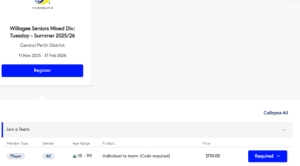
This option (under the district competition you are registering in) will have a drop-down menu appear with a ‘Required‘ button. Clicking this button will bring up a list of pre-registered teams and you will need to select your team from the list, enter your team code for access, then complete the registration process following the prompts.
‘Register myself to an event or competition‘
Players will choose this option if they do not have a team organised to play in and are looking for a team to join
Registering via this option will have you placed into a pool where we will allocate you a team that best suit yours and their needs OR in the case where there are enough individual registers inside the pool of the same ability, a team will be made from these. Note – If you have a friend/group of friends who are also registering via this option and you would like to be kept together, you will have the opportunity to include their names during the rego process. In doing so, we will ensure you are in the same team when we allocate you one.
‘How to guide’ using features on the Assemble Sports Registration platform